Mcp
An open standard developed by Anthropic to enable large language models (LLMs) to interact seamlessly with external tools, systems, and data sources
- Allows access to various external systems (computer files, an API, a browser, or anything else)
- reading files, executing functions, querying databases, and interacting with APIs → makes them more “context aware”
-
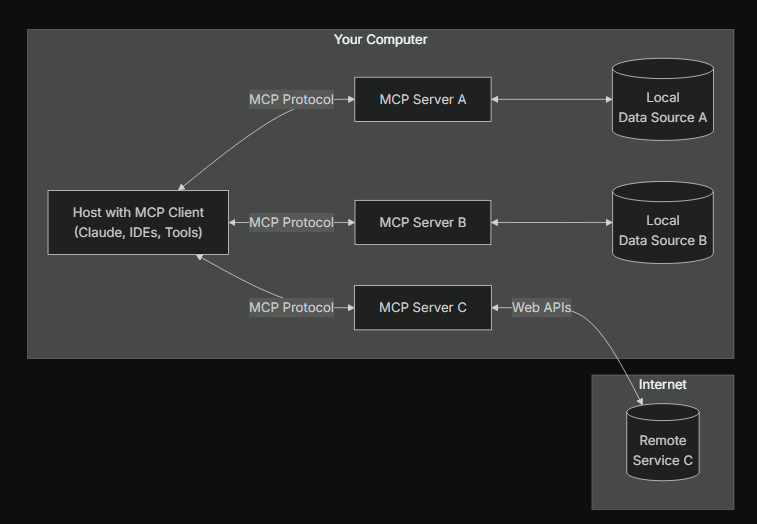
diagram 1
Transclude of image.avif
-
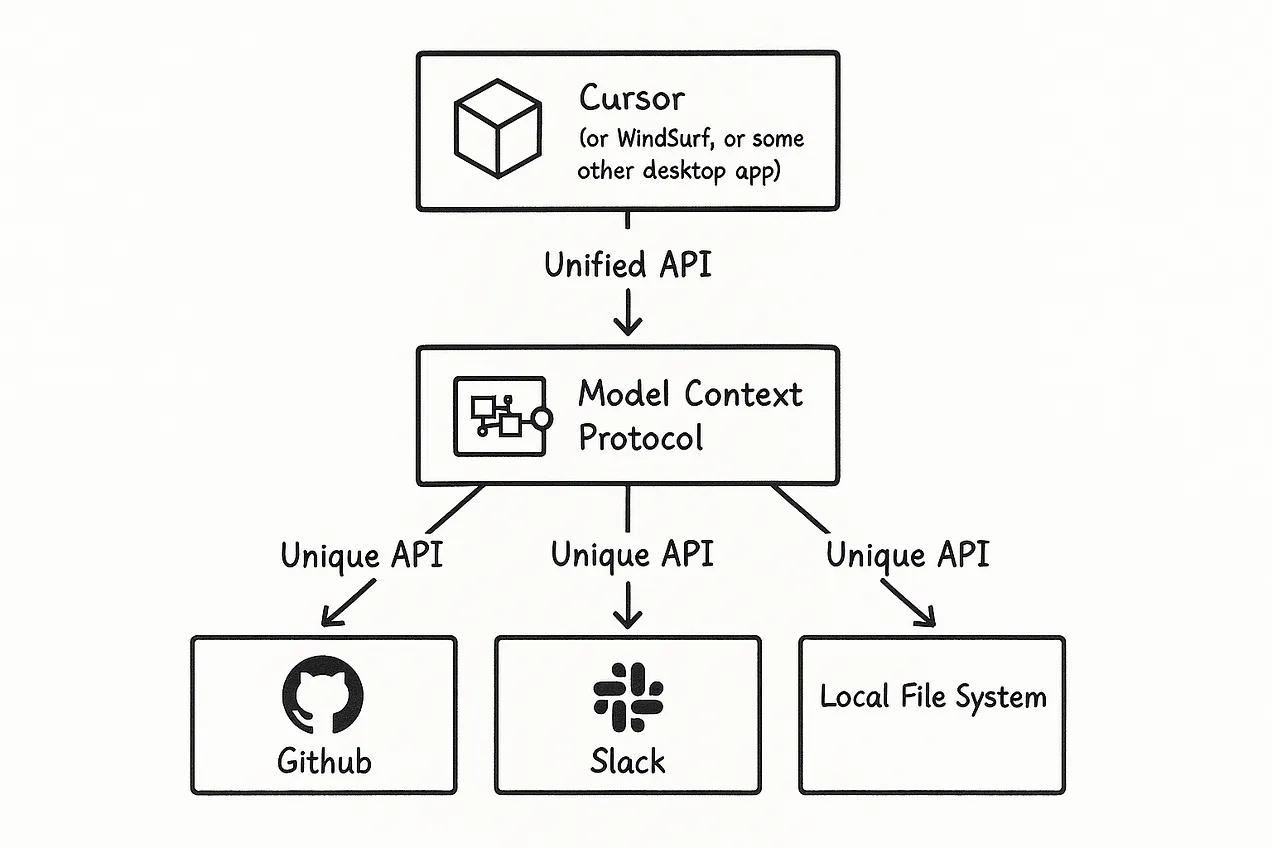
diagram 2
-
Amazing resourzes
Introduction
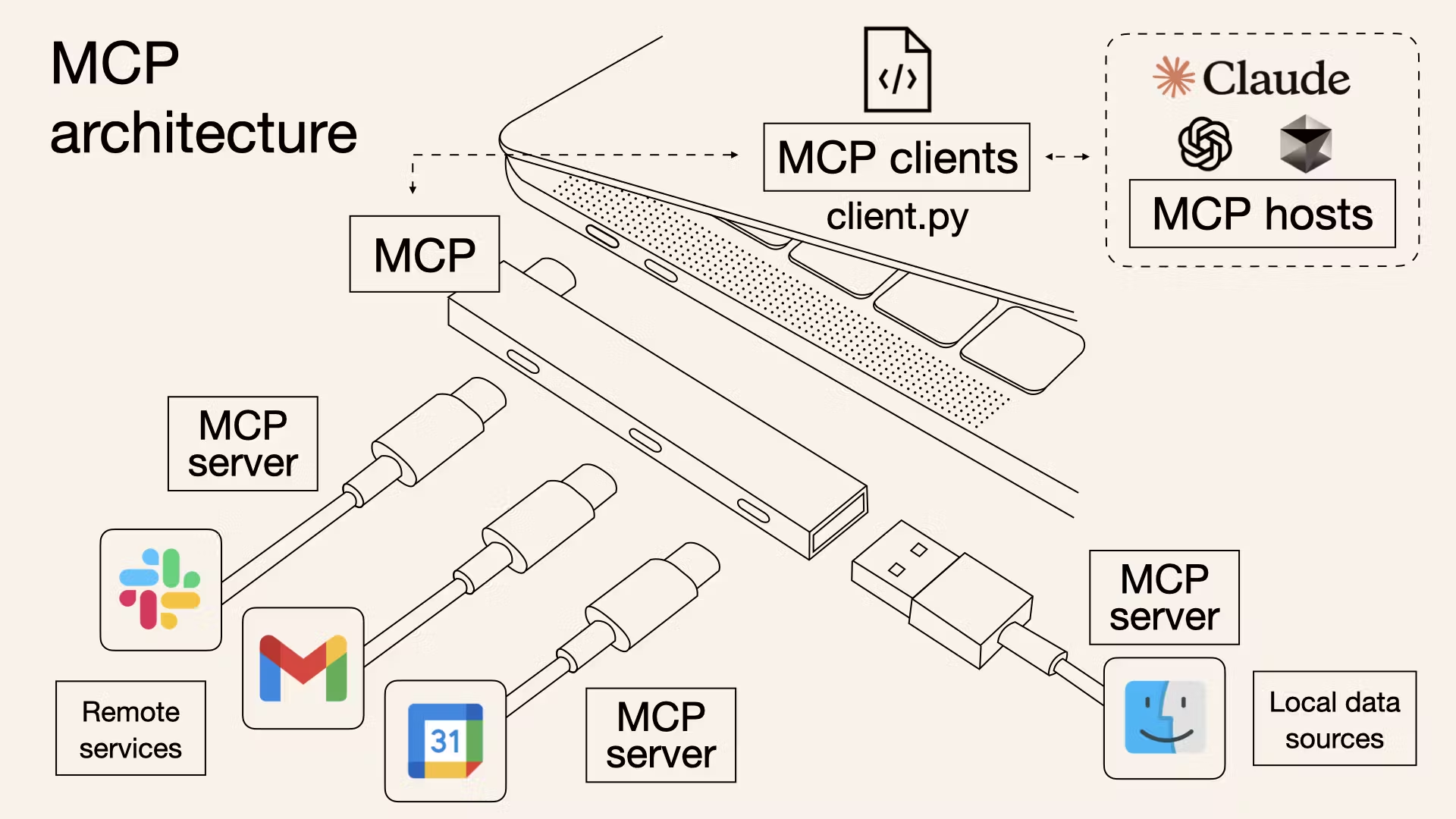
- Acts as a “universal translator” or “USB-C port”
- Addresses the fundamental challenge of AI models needing consistent and secure access to necessary information, regardless of location
- MCP lets an AI assistant talk to various software tools using a common language, instead of each tool requiring a different adapter or custom code
- The emergence of MCP reflects an important trend of standardization in the AI tool ecosystem
- A core idea of agentic AI
- LLMs don’t just simply generate text, but has a clear intention to do specific processes/tasks to achieve a goal
- By separating AI models (clients) from data/tool providers (servers), developers can independently develop, update, and scale these components
- a fundamental architectural pattern for building robust enterprise-grade systems
- For example, separate teams can independently develop MCP servers for financial data and CRM data without affecting the core AI application
The problems it solved
- Problem of fragmented integrations
- Each integration needs a custom adapter (it’s brittle and doesn’t scale)
- Ex) AI IDE might use one method to get code from Github, another to fetch data from a DB, etc
- MCP offers one common protocol ⇒ Instead of writing separate code for each tool, a developer can implement the MCP specification and instantly make their application accessible to any AI that speaks MCP
- Problem of LLMs of having knowledge limitations
- MCP acts as a perfect way to get access to “updated” knowledge and act actively as an AI agent
Basically (from what i understood) 📌
- Before and after
- Before every AI app had to build custom code to each tool (like Google drive)
- But now we just get the server someone else made for us and just “plug it in” like a USB (users POV)
- If you’re a a developer, you can can implement the MCP specification and instantly make their application accessible to any AI that speaks MCP
- In order to build an MCP server
- You have to expose the endpoints to the LLM with good documentation (input/output) for the LLM to understand
- Make it easy for the AI to use
- You have to understand the app pretty well & know how to use it programmatically
- You have to expose the endpoints to the LLM with good documentation (input/output) for the LLM to understand
- Use cases
- Unity MCP
- Rapid prototyping
- Making LLM do the boilerplate of setting the environment (setting 100 trees in random locations)
- Doing automated AI testing (edge cases, like what happens if I put the character there? if i do
xyz?)
- Figma MCP
- Unity MCP
MCP architecture
- MCP hosts
- An AI application that receives user requests and seeks to access context through MCP - the main application
- Examples:
Claude for desktop,GPT Desktop, Cursor, different LLM applications that can connect to MCPs - LLM in here decides if MCP is necessary
- If so, the host uses the MCP client as the orchestrator
- MCP client
- Resides within the MCP Host and handles communication (the 1:1 connection) to an MCP server (or more)
- If the AI wants to use a particular tool, it will connect through an MCP client to that tool’s MCP server
- The client will then handle the communication (open a socket, send/receive msg) and present the server’s responses to the AI model
- Transforms user requests into a structured format that the MCP protocol can process ⇒ Responsible for sending the request to the appropriate MCP server
- Session manager
- handling interruptions, timeouts, reconnections, and session terminations
- parses responses, handles errors, and ensures that responses are appropriate for the context
- Examples
- IBM® BeeAI, Microsoft Copilot Studio, and Claude.ai
- Resides within the MCP Host and handles communication (the 1:1 connection) to an MCP server (or more)
- MCP server
- Lightweight adapters that run alongside a specific application or service, that exposes that application’s functionality (its “services”) in a standardized way
- just think of them as “plugins”<<
- Ex) a Blender MCP server knows how to map “create a cube and apply a wood texture” into Blender’s Python API calls
- The server primitives
- Resources: File-like data that can be read by clients (like API responses or file contents)
- Tools: Functions that can be called by the LLM (with user approval)
- Prompts: Pre-written templates that help users accomplish specific tasks
- Lightweight adapters that run alongside a specific application or service, that exposes that application’s functionality (its “services”) in a standardized way
- The MCP Protocol
- The language and rules that the clients/servers use to communicate
- Defines message formats, how a server advertises its available commands, how an AI asks a question or issues a command, how results are returned, etc
- Transport-agnostic
- The protocol can work over HTTP/Websockets for remote/standalone servers, or even standard IO streams for local integrations
- The protocol ensures that whether an AI is talking to a design tool or a db, the handshake and query format are consistent
- This consistency allows AI to use one MCP server to another (“grammar” remains the same)
Example Interaction Walkthrough
- The user interacts with the MCP host application
- The LLM within the host determines that external data or tools are needed
- The MCP host uses the MCP client to translate this need into a tool call of the MCP protocol
- The MCP client routes the request to the appropriate MCP server
- The MCP server executes the requested tool or retrieves the data
- The MCP server returns the formatted results to the MCP client
- The MCP client passes this result back to the host/LLM to be used in generating the final response
Advantages
- Standardization and Interoperability
- MCP provides a common language for AI to connect with data and tools, enabling seamless interaction between different systems (not tied to specific vendors/technologies)
- Simplified Integration and Reduced Overhead
- eliminates the need to develop custom connectors for every tool and data source
- Enhanced Security and Governance
- Existing security mechanisms (e.g., AWS IAM) can be utilized to apply consistent access control
- Authentication
- Scalability and Configurability
- As MCP is based on a modular design, it supports the construction of scalable AI solutions that align with AWS architecture best practices
- Context-Aware AI
- AI models can utilize richer and more accurate contextual information
Resources
- backend explained - my notes for client vs server, etc
- posts
- list of servers!!
- docs
- quickstart - https://modelcontextprotocol.io/introduction
- for server devs - https://modelcontextprotocol.io/quickstart/server
- cursor + mcp
- 안될공학 - https://youtu.be/Qdu6Sv-NpeU?si=l1LaAWM_R3Tjlg7L
Setting MCP (claude) on my pc
4/24/25
- quickstart tutorial - https://modelcontextprotocol.io/quickstart/user#why-claude-for-desktop-and-not-claude-ai
- actually let it write a poem about snorlax and it did lol

- actually interesting, i want to brainstorm what types of stuff this can do & its potential
- start → building a simple web server tutorial
Questions
- How does MCP extend beyond the capabilities of a typical Retrieval-Augmented Generation (RAG) system?
- While RAG provides passive context by retrieving text, MCP allows the model to actively fetch context or perform actions by invoking tools.
- What is meant by ‘dynamic discovery’ in the context of MCP?
- AI agents can automatically detect available MCP servers and their capabilities at runtime without needing hard-coded integrations.
- What is a key security principle for MCP implementors regarding tool usage?
- Hosts must obtain explicit user consent before invoking any tool, and users must understand what the tool does.
- Hosts must obtain explicit user consent before invoking any tool, and users must understand what the tool does.
- MCP Inspector
- https://modelcontextprotocol.io/docs/tools/inspector
- When might MCP be considered overkill for an application?
- If an AI model only needs to access one or two straightforward APIs, direct API calls might be a more efficient solution.