LCEL
LangChain composes chains of components
components
- Python
- for each component:
- as stated earlier, u can call
invoke,stream,batchor anything and it will do its job - they all have the exact same connector → because they share one interface u can snap them tgt into a chain using
|
- as stated earlier, u can call
| Component | Input type | Output type |
|---|---|---|
| Prompt | Dictionary - Python Dictionary (Hashmap) | Prompt Value |
| Retriever | Single String | List of Documents |
| LLM | String, list of messages or prompt value | String |
| ChatModel | String, list of messages or prompt value | ChatMessage |
| Tool | String/Dictionary | Tool dependent |
| Output Parser | Output of LLM or ChatModel | Parser dependent |
- All components have an
interface→ theRunnableprotocol:- (components are listed below)
Runnablesare immutable → u have to reassign to a new variable!- Common methods include
stream- stream back chunks of the response
- asynchronous ver:
astream
invoke- call the chain on one input
- Called on
ChatPromptTemplateobject: takes in the input variables and substitutes the placeholders, creating a prompt that can be sent to a language model - Called on
model: used as an input query to trigger a response - Called on
output_parser: used to process the raw output from a language model and convert it into a structured format
- Called on
- asynchronous ver:
ainvoke
- call the chain on one input
batch- call the chain on a list of inputs (parallel)
- asynchronous ver:
abatch - If you want to ask 5 questions at once, you don’t need a for-loop → You just call
chain.batch([input1, input2, input3...])- LangChain automatically parallelizes it for you - it might accidentally trigger rate limit errors → use
configdictionarychain.batch(nputs, config={"max_concurrency":5}
prompt = ChatPromptTemplate.from_template("Tell me a short joke about {topic}")
model = ChatOpenAI()
output_parser = StrOutputParser()
chain = prompt | model | output_parser

chain.invoke({"topic": "bears"})
# "Why do bears have hairy coats?\n\nBecause they don't like to shave!"
chain.batch([{"topic": "bears"}, {"topic": "frogs"}])
# ["Why do bears have hairy coats?\n\nBecause they don't like to shave!",
#   'Why did the frog take the bus to work?\nBecause his car got toad away!']
for t in chain.stream({"topic": "bears"}):
print(t)- Common have common properties
input_schemaoutput_schema
- Why use
LCEL?- Async, batch, and streaming support
- fallbacks (safety mechanism)
- parallelism
- llm calls can be time consuming.. any components that can be run in parallel are
- built in logging (being able to see the sequence of steps becomes crucial as app grows)
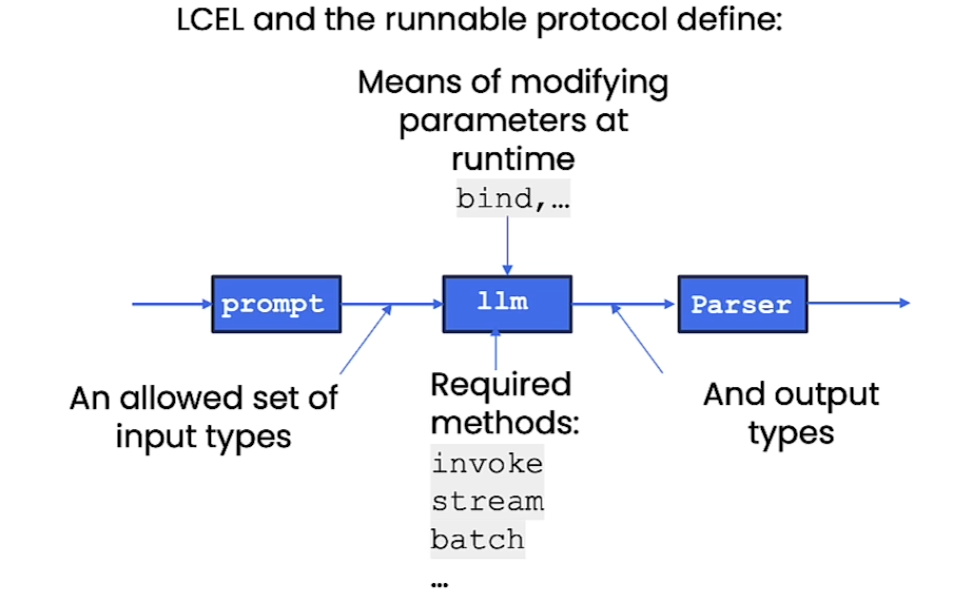
- Composition can use the linux pipe syntax
Chain = prompt | llm | OutputParser- The output of prev becomes input of next
- diagram
Normally this is how you would do it:
!pip install langchain
!pip install openai
!pip install chromadb
!pip install tiktoken

import os
# Set the OPENAI_API_KEY environment variable
os.environ['OPENAI_API_KEY'] = "..."

from langchain.chat_models import ChatOpenAI
from langchain.prompts import ChatPromptTemplate
from langchain.schema.output_parser import StrOutputParser

#Initializing model
model = ChatOpenAI()

#Defining output parser to interpret model's response as a strong
output_parser = StrOutputParser()

#Defining a prompt template for generating a product description from a string of product notes
prompt = ChatPromptTemplate.from_template(
	"Create a lively and engaging product description with emojis based on these notes: \n" "{product_notes}"
)

prompt_value = prompt.invoke({"product_notes": "Multi color affordable mobile covers"})
# Output: ChatPromptValue(messages=[HumanMessage(content='Create a lively and engaging product description with emojis based on these notes: \nMulti color affordable mobile covers')])

prompt_value.to_messages()
#Output:[HumanMessage(content='Create a lively and engaging product description with emojis based on these notes: \nMulti color affordable mobile covers')]

model_output = model.invoke(prompt_value.to_messages())
#Output: AIMessage(content="🌈📱Get ready to dress up your phone in a kaleidoscope of colors with our multi-color affordable mobile covers! 🎉💃✨🌈...(cut)"

output_parser.invoke(model_output)
#Output: 🌈📱Get ready to dress up your phone in a kaleidoscope of colors with our multi-color affordable mobile covers! 🎉💃✨🌈...(cut)"
But using LCEL it’s way easier
from langchain.chat_models import ChatOpenAI
from langchain.prompts import ChatPromptTemplate
from langchain.schema.output_parser import StrOutputParser
#Initializing model
model = ChatOpenAI()

#Defining output parser to interpret model's response as a strong
output_parser = StrOutputParser()

#Defining a prompt template for generating a product description from a string of product notes
prompt = ChatPromptTemplate.from_template(
	"Create a lively and engaging product description with emojis based on these notes: \n" "{product_notes}"
)

chain = prompt | model | output_parser

# We can call invoke on the chain itself!
product_desc = chain.invoke({"product_notes": "Multi color affordable mobile covers"})

print(product_desc)
#Output: 🌈📱 Introducing our vibrant and pocket-friendly mobile covers! 🎉🤩 🌈🌟 Get ready to add a pop of color to your beloved device with our multi-colored mobile covers! Designed to make heads turn and hearts skip a beat, these cases are a true fashion statement in themselves. 🌈💃

for chunk in chain.stream({"product_notes": "Multi color affordable mobile covers"}): print(chunk, end="", flush=True)
#Output; 🌈📱 Introducing our fabulous multi-color mobile covers! 🎉💃 Add a pop of color and a dash of personality to your phone with these affordable and trendy accessories! 💥💯
- You can even run in batches very easily, it handles parallelism code for you!
- https://python.langchain.com/v0.2/docs/introduction/
LCEL with RAG
from langchain.embeddings import OpenAIEmbeddings
from langchain.prompts import ChatPromptTemplate
from langchain.schema.runnable import RunnableParallel, RunnablePassthrough
from langchain.vectorstores import Chroma
from langchain.chat_models import ChatOpenAI

#External docs
docs = [ "Social Media and Politics: The Cambridge Analytica scandal revealed how social media data could be used to influence political opinions. The company collected personal data from millions of Facebook users without consent and used it for political advertising. This event sparked a global discussion on data privacy and the ethical responsibilities of social media platforms.", "Renewable Energy Progress: Solar power technology has seen significant advancements, with the development of photovoltaic cells that can convert more than 22% of sunlight into electricity. Countries like Germany and China are leading in solar energy production, contributing to a global shift towards renewable energy sources to combat climate change and reduce reliance on fossil fuels." ]

#vectorstore = embedding database
vectorstore = Chroma.from_texts(
	docs,
	embedding=OpenAIEmbeddings(),
)
# Retriever: a tool that searches an embedding database created from the documents provided in the `docs` variable.
retriever = vectorstore.as_retriever(search_kwargs={"k": 1})
retriever.invoke("how social media data used to influence political opinions")
#Output: [Document(page_content='Social Media and Politics: The Cambridge Analytica scandal revealed how social media data could be used to influence political opinions. The company collected personal data from millions of Facebook users without consent and used it for political advertising. This event sparked a global discussion on data privacy and the ethical responsibilities of social media platforms.')]

template = """Answer the question based only on the following context: {context} Question: {question} """
prompt = ChatPromptTemplate.from_template(template)
model = ChatOpenAI()
output_parser = StrOutputParser()

# setup_and_retrieval = RunnableParallel(
#   {"context": retriever, # `context` is processed by the `retriever`.
#   "question": RunnablePassthrough() # `question` is processed by `RunnablePassthrough`
#  }
# )

chain = {"context": retriever, "question": RunnablePassthrough()} | prompt | model | output_parser

chain.invoke("how social media data used to influence political opinions")- Chain Process
- The
retriever- chain then calls
retriever.invoke(x)& putsxas input invokecallsself.get_relevant_documents→ searches external docs and retrieves relevant chunks related to query
- chain then calls
RunnablePassThrough()simply forwards the query- The retrieved context (relevant document chunks) and the original question are combined into a structured format by the
prompt - The
prompttemplate generates a complete prompt using the combined context and question - The
modelgenerates a response based on the prompt - The
output_parserprocesses and formats the response.
- The
📌 You can use RunnableMap as well
- but we use the shorthand whenever possible (
RunnablePassthrough)
from langchain_core.runnables import RunnableMap

chain = RunnableMap({
    # Input 'x' is the string "how social media..." BELOW
    # We manually call the retriever on it
    "context": lambda x: retriever.invoke(x),

    # We manually return x as the question
    "question": lambda x: x
}) | prompt | model | output_parser

chain.invoke("how social media data used to influence political opinions")
Bind
- OpenAI Function Calling - general idea
- with runnables we can bind parameters
- example of openai functions → we wanna call an LLM w/ these functions
functions = [
    {
      "name": "weather_search",
      "description": "Search for weather given an airport code",
      "parameters": {
        "type": "object",
        "properties": {
          "airport_code": {
            "type": "string",
            "description": "The airport code to get the weather for"
          },
        },
        "required": ["airport_code"]
      }
    }
  ]
prompt = ChatPromptTemplate.from_messages(
    [
        ("human", "{input}")
    ]
)
model = ChatOpenAI(temperature=0).bind(functions=functions)
runnable = prompt | model
runnable.invoke({"input": "what is the weather in sf"})
AIMessage(content='', additional_kwargs={'function_call': {'name': 'weather_search', 'arguments': '{"airport_code":"SFO"}'}})
Fallbacks
- really powerful
- u can have fallbacks to individual components and entire sequences
scenario: we want the model to output json
from langchain.llms import OpenAI
import json

simple_model = OpenAI(
	temperature=0,
	max_tokens=1000,
	model="gpt-3.5-turbo-instruct"
)
simple_chain = simple_model | json.loads
challenge = "write three poems in a json blob, where each poem is a json blob of a title, author, and first line"
simple_model.invoke(challenge)
'\n\n{\n "title": "Autumn Leaves",\n "author": "Emily Dickinson",\n "first_line": "The leaves are falling, one by one"\n}\n\n{\n "title": "The Ocean\'s Song",\n "author": "Pablo Neruda",\n "first_line": "I hear the ocean\'s song, a symphony of waves"\n}\n\n{\n "title": "A Winter\'s Night",\n "author": "Robert Frost",\n "first_line": "The snow falls softly, covering the ground"\n}'
this will fail:
simple_chain.invoke(challenge)
"""JSONDecodeError: Extra data: line 9 column 1 (char 125)"""
Solution → add StrOutputParser()
model = ChatOpenAi(temperature=0)
chain = model | StrOutputParser() | json.loads
chain.invoke(challenge){'poem1': {'title': 'The Rose',
'author': 'Emily Dickinson',
'firstLine': 'A rose by any other name would smell as sweet'},
'poem2': {'title': 'The Road Not Taken',
'author': 'Robert Frost',
'firstLine': 'Two roads diverged in a yellow wood'},
'poem3': {'title': 'Hope is the Thing with Feathers',
'author': 'Emily Dickinson',
'firstLine': 'Hope is the thing with feathers that perches in the soul'}}final_chain = simple_chain.with_fallbacks([chain])
final_chain.invoke(challenge)final_chain = simple_chain.with_fallbacks([chain])- Plan A (
simple_chain): Try to run thesimple_model.If Plan A crashes (raises an Exception), catch the error. - Plan B (
[chain]): Automatically switch to the fallback chain (the one withChatOpenAI) and try again.
- Plan A (
- Why would u need this
- in production often u use a cheaper/aster model (like
gpt-3.5-turbo-instruct) as ur main driver to save money, but it might fail complex tasks - it’s a built in try-catch block
- in production often u use a cheaper/aster model (like