- What if we have multiple tables in a db?
.tables- particular to sqlite that shows me the tables in this database
- Relational database
- Multiple tables that has a relationship among them
- Ex) Author writing a book - table of authors and table of books
- Relationships
- One to one (1:1)
- Authors only write one book
- One to Many (1:N)
- Authors can write multiple books
- Many represents
0or more, it asks the maximum number (cardinality)
- Many to Many (N:N)
- One author can write multiple books, A book can be written by more than one author
- One to one (1:1)
- 2 things in DB design
- Cardinality (The Maximum): Can it be just one, or can it be many?
- Optionality (The Minimum): Must it have at least one, or can it have zero?
- When we name a relationship (like one to many or many to many), we only look at the cardinality (the maximums) and ignore the 0s
0or1→ “One”0or Many → “Many”
ER Diagrams
- Tools to visualize - Entity Relationship Diagrams (ER Diagrams)
erDiagram
    Author }|--|{ Book : wrote
    Publisher ||--|{ Book : published
    Translator }o--|{ Book : translated
    Book ||--o{ Rating : has
-
Author and Book
- Many to Many → an author has one or many books, a book is written by one or many authors
-
Publisher and Book
- One to Many → a publisher has one or many books, a book has only one publisher
||under publisher represents exactly one (mandatory one)- One to Many = Many to One (but in db design we just call it One to Many)
-
Translator and Book
- Many to Many → a translator has one or many books, a book might have 0 or many translators (0 or more)
- Even though a book might have
0translators, it can have many, so it’s still a many to many relationship
-
Book and Rating
- One to Many → a book has 0 or many ratings (more than one), a rating is related to only one book
- Even though a book can have
0ratings, it can have many, so it’s still a one to many relationship
-
Crows foot notation

- Use these to represent relationships
-
Examples (read to left to write)
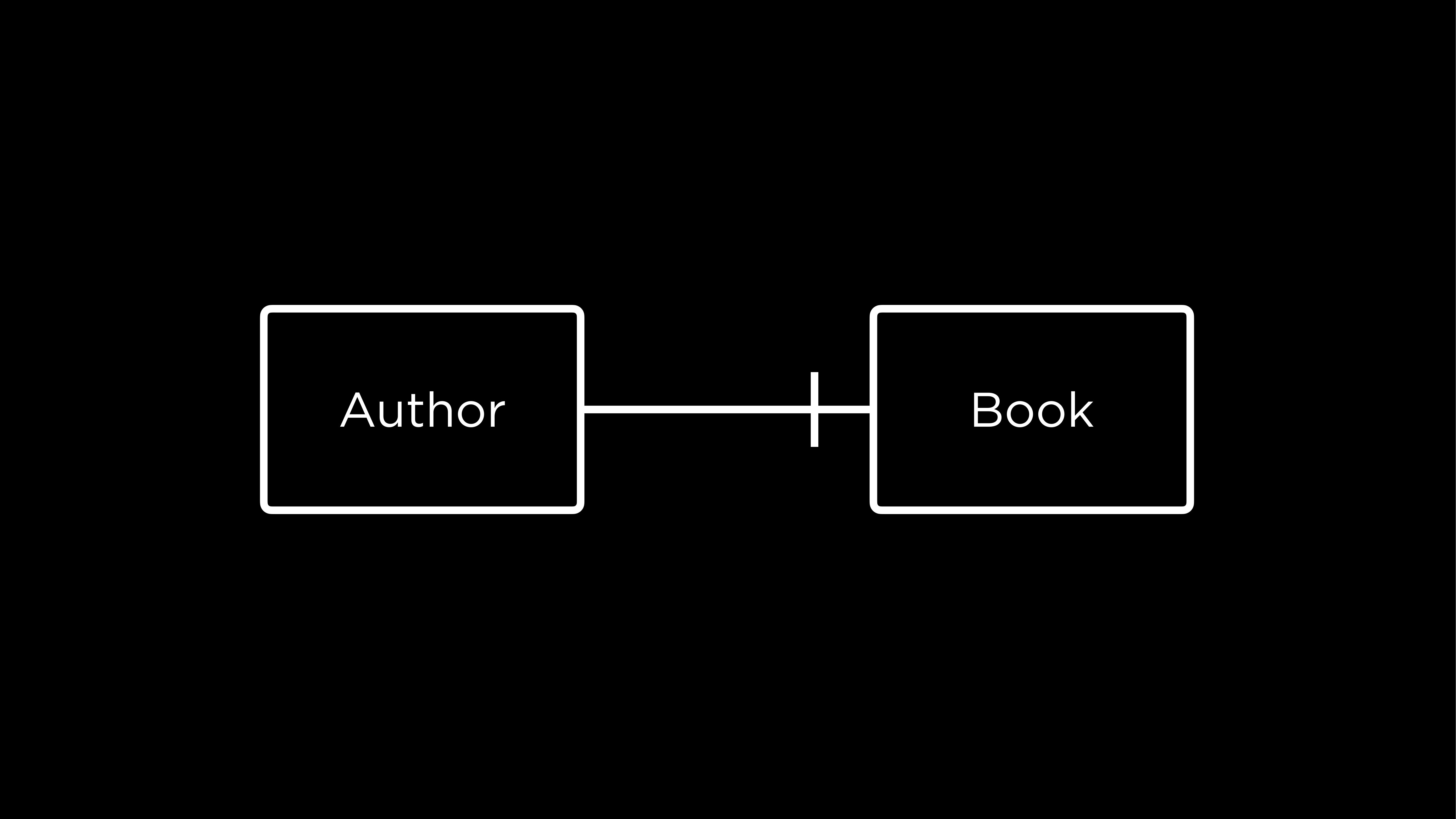
- An author writes one book (every author can have one book associated with them)
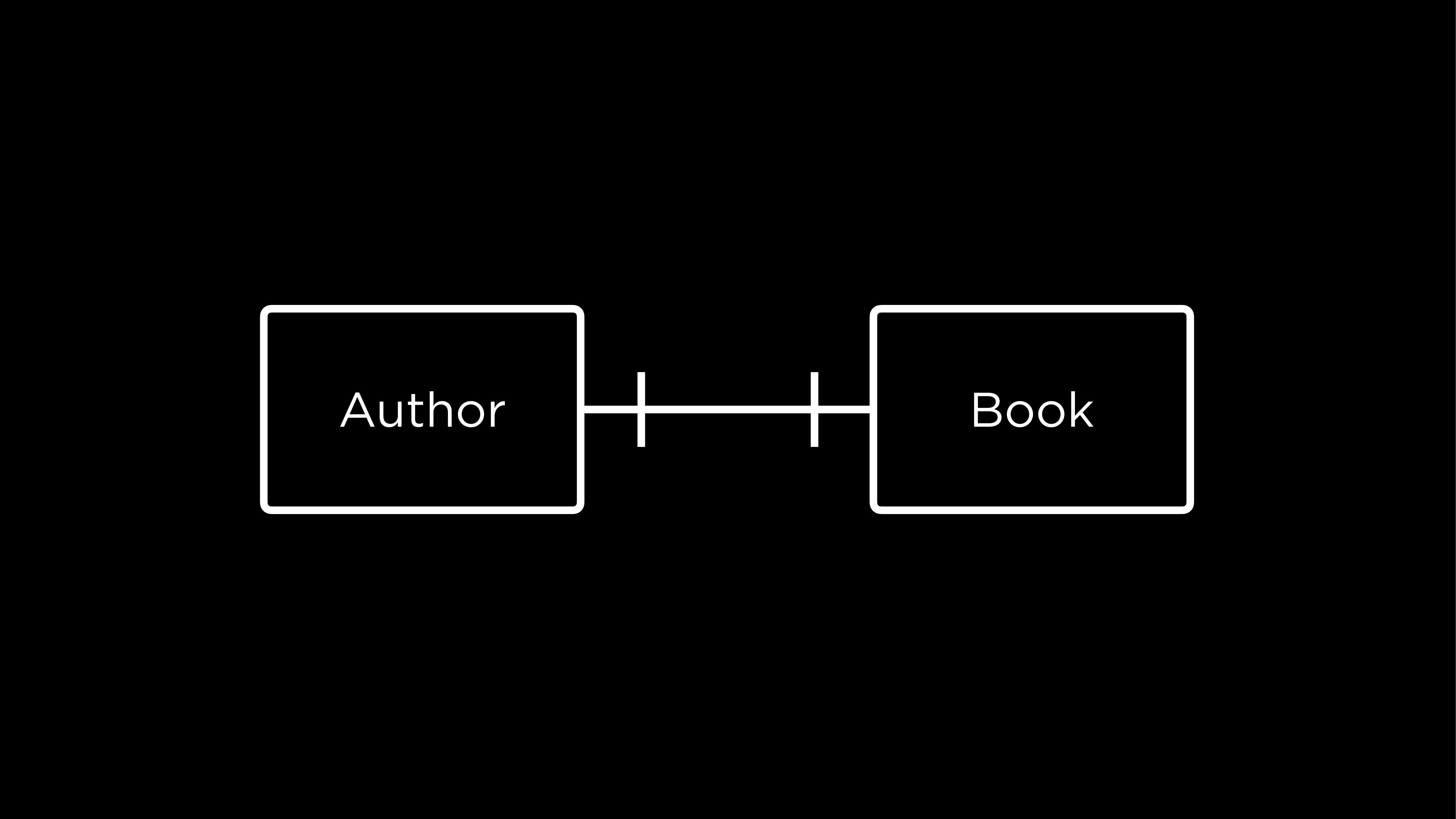
- An author can have only one book and a book can have only one author
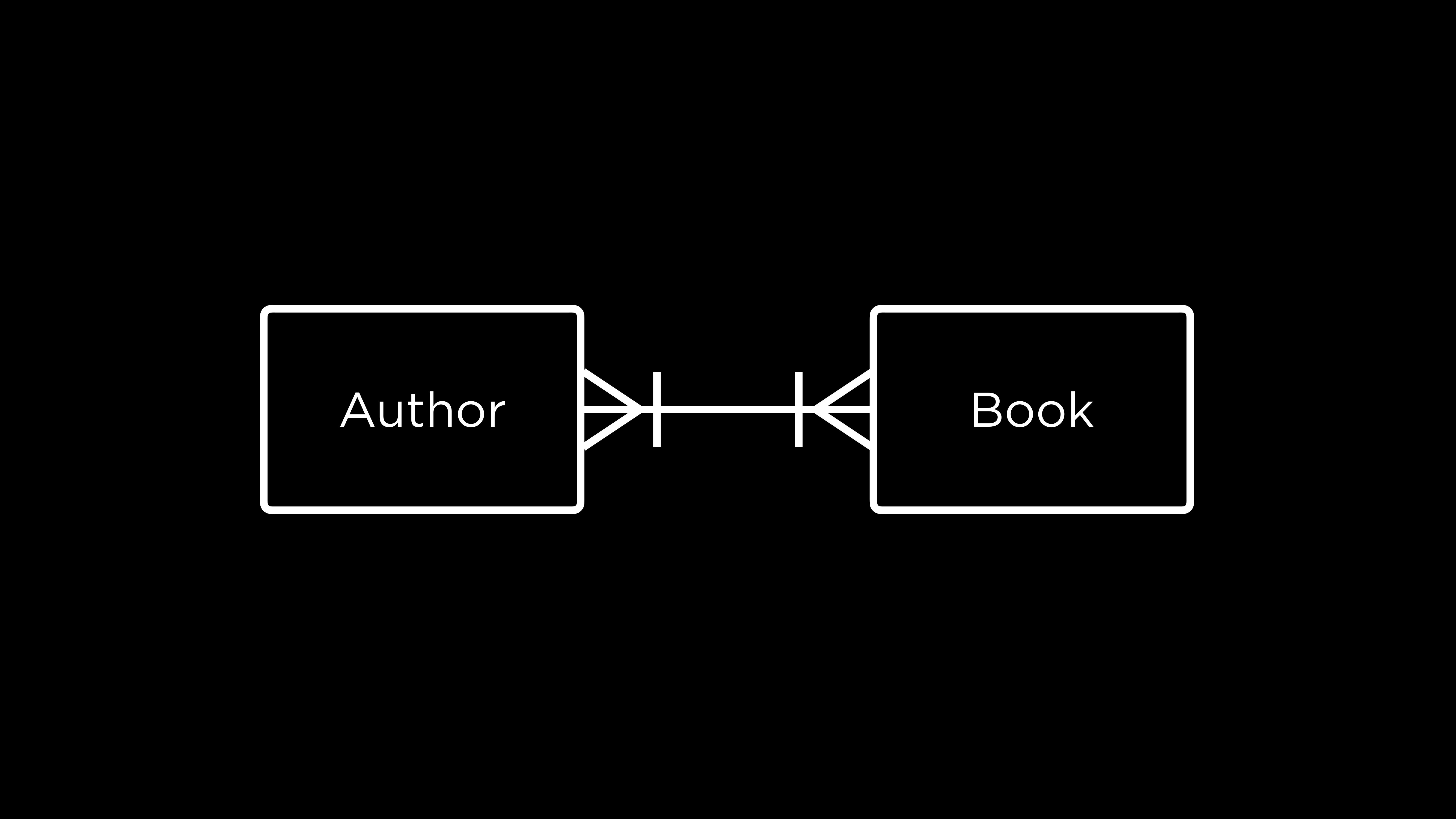
- An author can have one or many books, and a book is written by at least one or many authors
- The one notation and many notation are combined
Keys
- Keys help relate tables in SQL
- Primary Key
- A unique identifier for any row in a table
- Books - ISBN → Every book has an unique identifier, like a key! Although using the ISBN itself would take lots of space, so using numbers starting from
1instead is better
- Foreign Key
- Taking a PK from a table and including it in a column in another table
- Examples
- One to Many
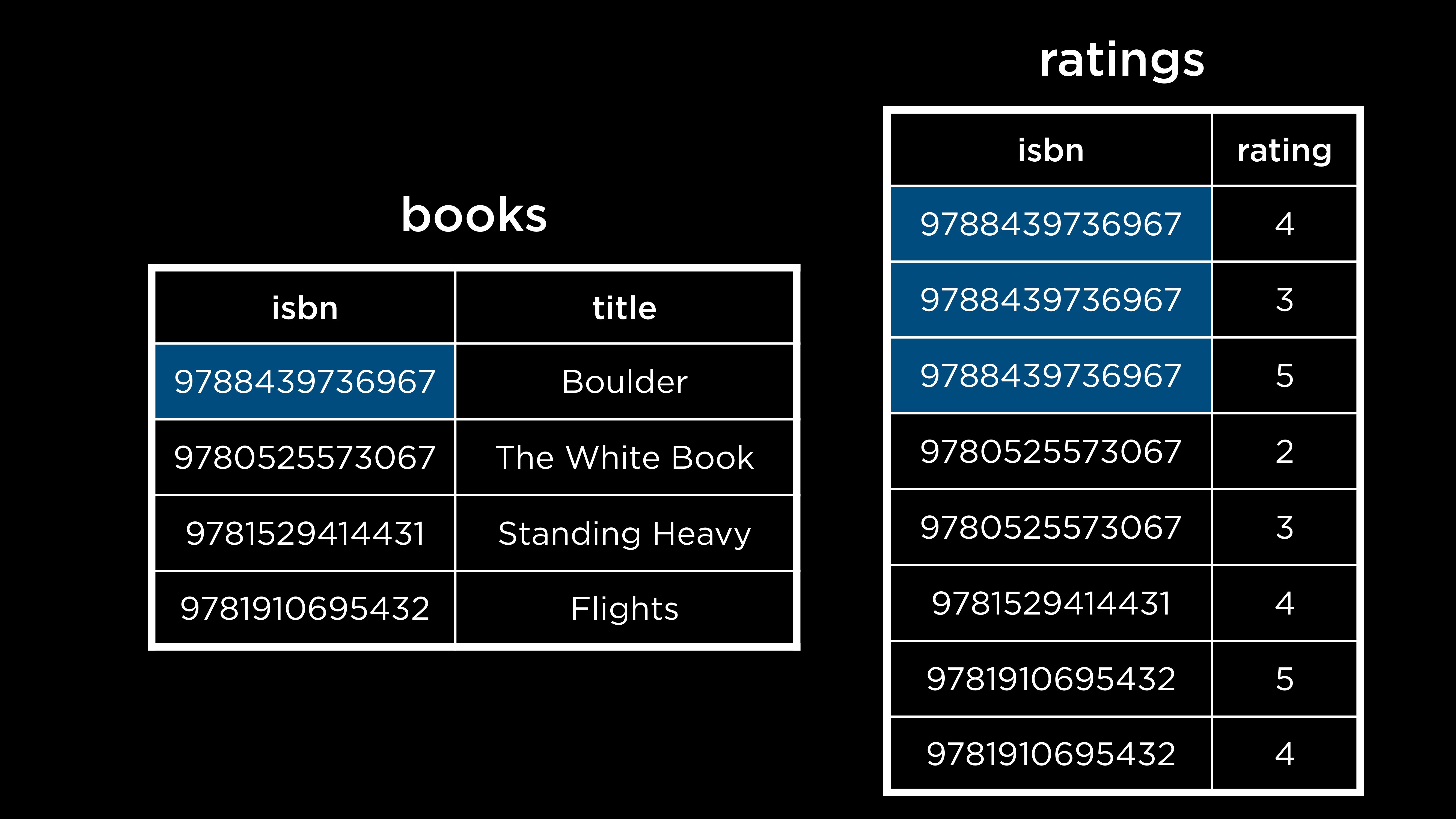
- We used ISBN here for the PK, but that’s long, so we can just use our own using numbers from
1
- Many to Many
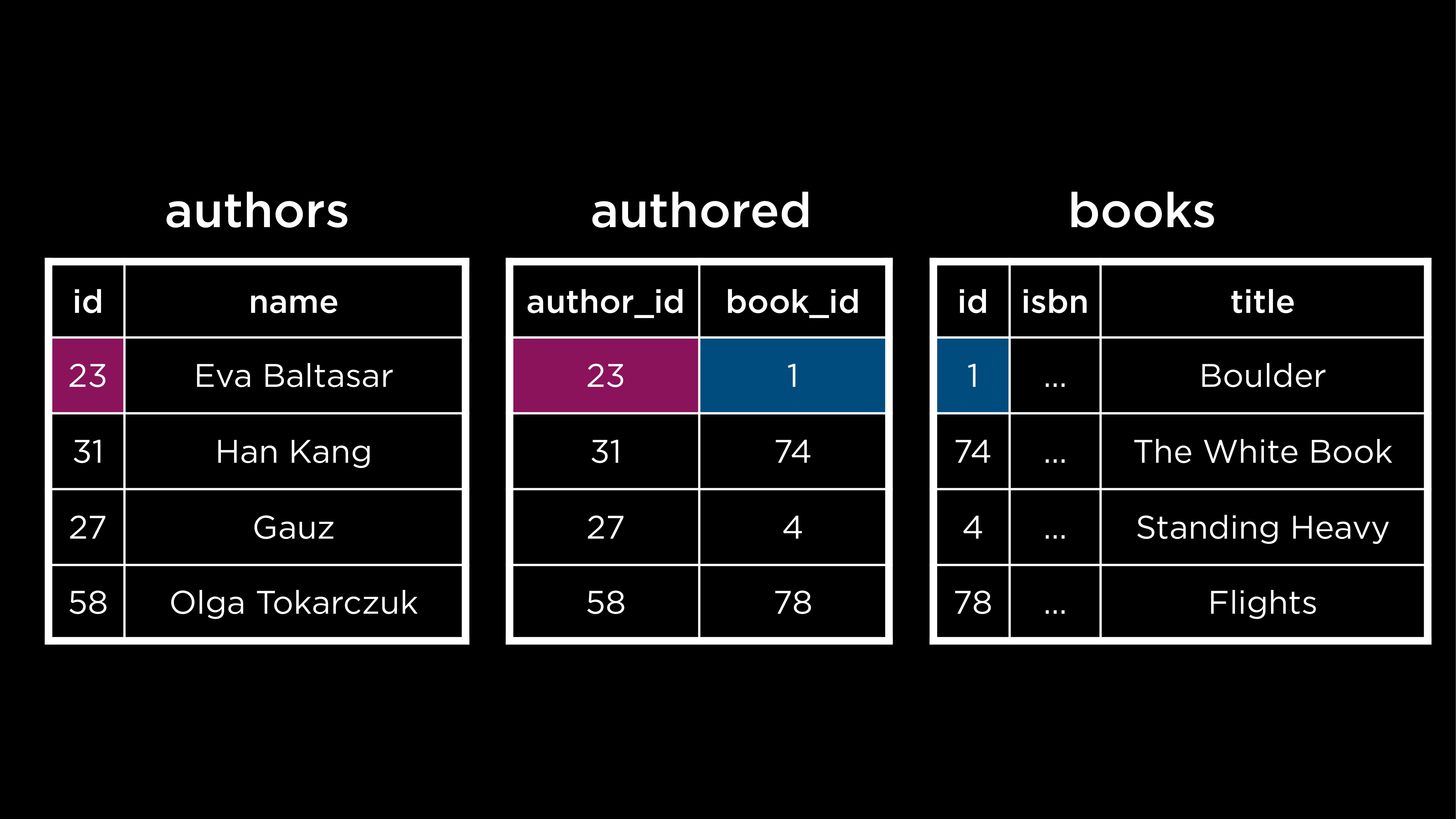
- In a physical database like SQL, you cannot directly implement a many to many relationship, you need to create a new table in the middle → junction table, or a join table
- breaks many to many into 2 one to many relationships
- contains Foreign Keys from both original tables
- composite key → The combination of these two keys usually forms the Primary Key for this new table
- There is now a table called
authoredthat maps the primary key ofbooks(book_id) to the primary key ofauthors(author_id)
- One to Many
Subqueries
- One query inside another query
Example of a one to many (book, publisher) query
SELECT "title"
FROM "books"
WHERE "publisher_id" = (
    SELECT "id"
    FROM "publishers"
    WHERE "publisher" = 'Fitzcarraldo Editions'
);()- The query in the parenthesis will be run first
- We make the query more dynamic without having to hardcode values
Example of a many to many query (author(s) who wrote the book Flights)
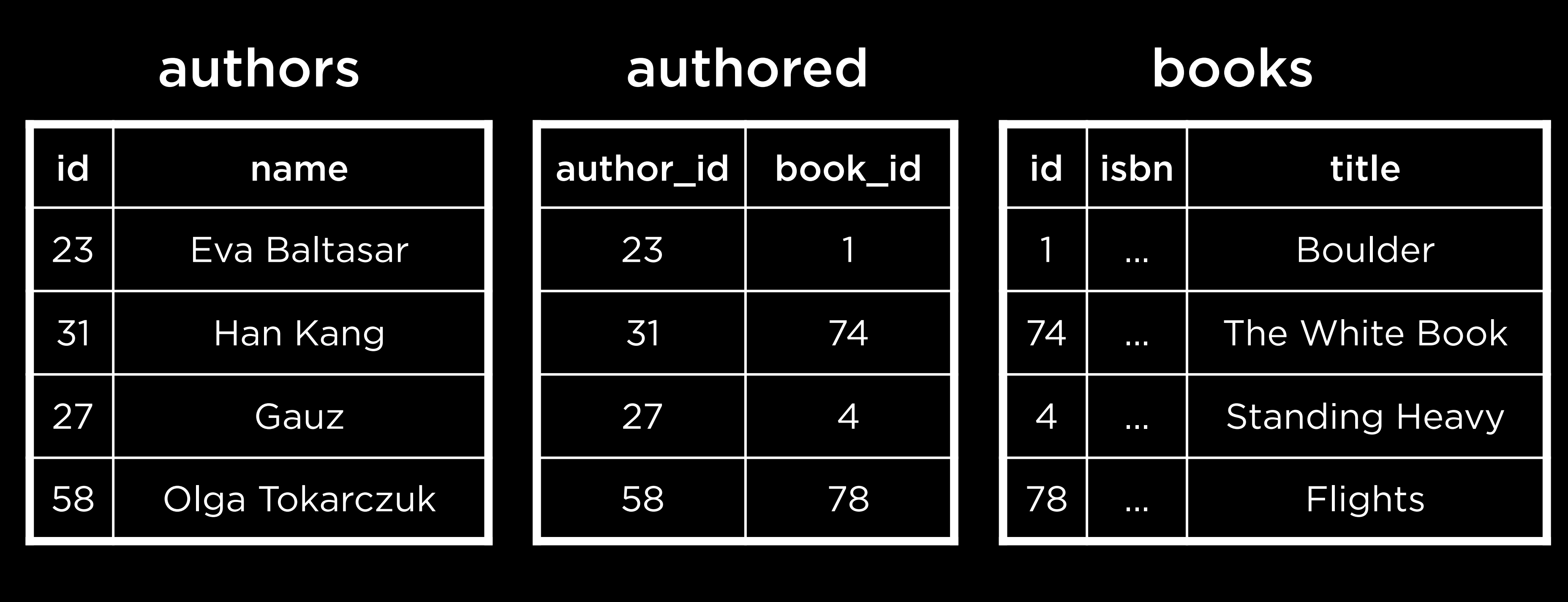
- Who wrote “Flights”?
- Find
idof flights inbooks - find
author_idinauthored - find
nameinauthors
- Find
SELECT "name" FROM "authors"
WHERE "id" = (
    SELECT "author_id" FROM "authored"
    WHERE "book_id" = (
      SELECT "id" FROM "books"
      WHERE "title" = 'Flights'
    )
);- The first query that is run is the most deeply nested one — finding the ID of the book Flights. Then, the ID of the author(s) who wrote Flights is found. Last, this is used to retrieve the author name(s).
IN
- But what if there are multiple authors of the same book?
SELECT "name" FROM "authors"
WHERE "id" IN (       -- Change '=' to 'IN' here
    SELECT "author_id" FROM "authored"
    WHERE "book_id" = (
      SELECT "id" FROM "books"
      WHERE "title" = 'Flights'
    )
);- If you want all books from one author
SELECT "title" FROM "books"
WHERE "id" IN (
    SELECT "book_id" FROM "authored"
    WHERE "author_id" = (
        SELECT "id" FROM "authors"
        WHERE "name" = 'Fernanda Melchor'
    )
);- You use
INbecausebook_idmight return more than 1 results - Using
=- The behavior of
=depends entirely on what the subquery returns at the specific moment you run - So if
"book_idhappens to return 1 result thenWHERE "id" =would work OK, but if it returns 2+ then it causes a runtime error
- The behavior of
- So you should know the relationship beforehand → basically you should code based on the ER Diagram
- Use
=when you’re querying a column with a unique constraint or a primary key- Example:
WHERE id = (SELECT id FROM authors ...) - Since an ID is unique, you are guaranteed to never get more than one result.
- Example:
- Use
INfor everything else (esp for FKs or regular columns)- Example:
WHERE id IN (SELECT book_id FROM authored ...) - Using
IN“future-proofs” your query so it doesn’t break when the data changes
- Example:
- Use
JOIN
- Combining tables
- We DO NOT get back a new permanent table in storage → it creates a result set
JOINjust temporarily “stitches” them together for you to read
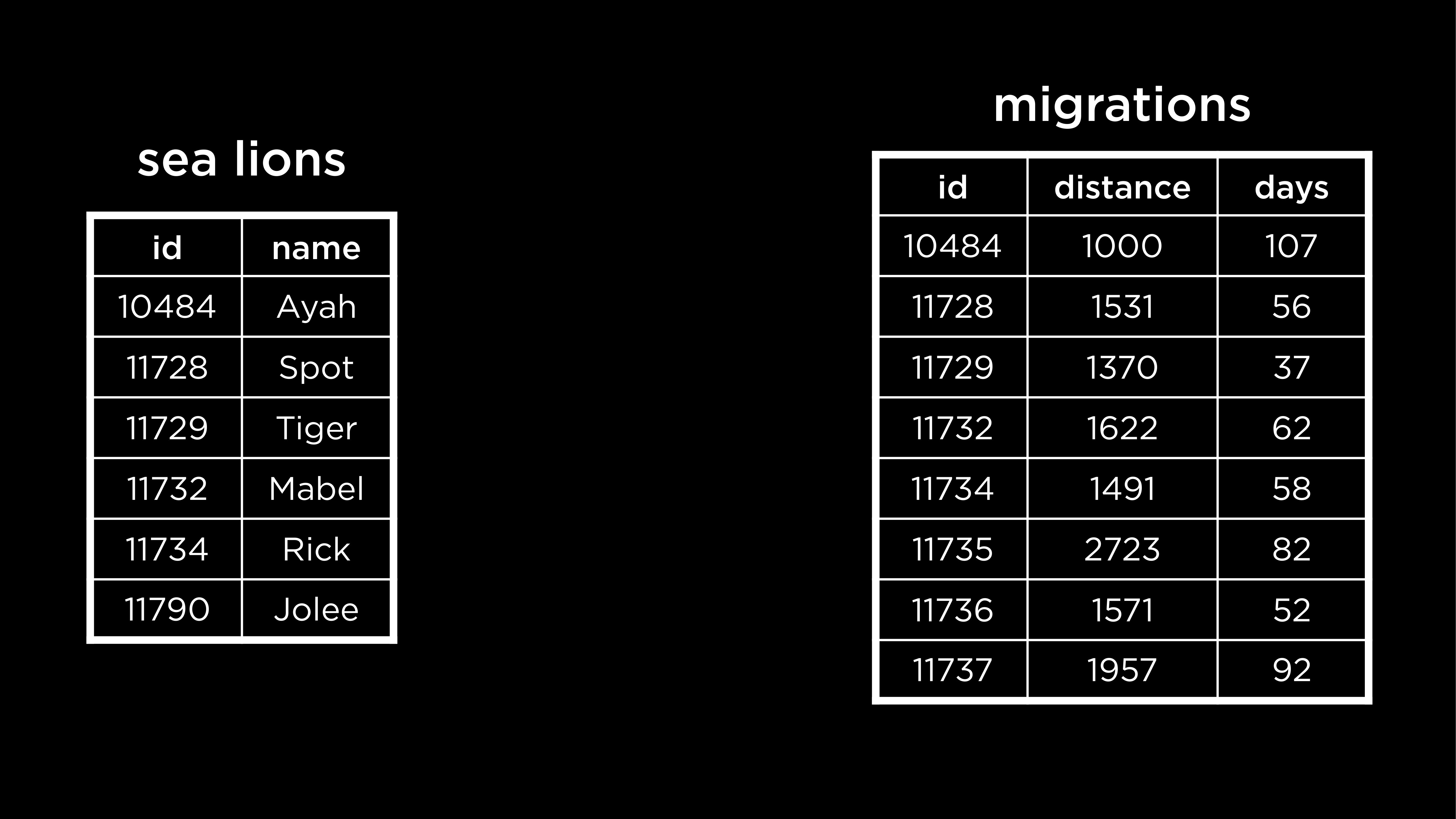
- Database we will use (
sea_lions,migrations)
INNER JOIN (intersection)
- only keeps data where both tables have a match
SELECT * FROM "sea_lions"
JOIN "migrations" ON "migrations"."id" = "sea_lions"."id";- We have ONLY rows that could actually JOIN together
- If the
idis not existing in the other table, it gets removed (for both tables)
- If the
+-------+-------+------------------------+-------+----------+------+
|  id   | name  |        species         |  id   | distance | days |
+-------+-------+------------------------+-------+----------+------+
| 10484 | Ayah  | Zalophus californianus | 10484 | 1000     | 107  |
| 11728 | Spot  | Zalophus californianus | 11728 | 1531     | 56   |
| 11729 | Tiger | Zalophus californianus | 11729 | 1370     | 37   |
| 11732 | Mabel | Zalophus californianus | 11732 | 1622     | 62   |
| 11734 | Rick  | Zalophus californianus | 11734 | 1491     | 58   |
+-------+-------+------------------------+-------+----------+------+
OUTER JOIN (extensions)
OUTERkeyword is often optional in syntax (LEFT JOIN = LEFT OUTER JOIN)LEFT, RIGHT, FULL
LEFT JOIN (LEFT OUTER)
- Prioritize the data on the left table (1st table that you start with)
SELECT * FROM "sea_lions"
LEFT JOIN "migrations" ON "migrations"."id" = "sea_lions"."id";+-------+--------+------------------------+-------+----------+------+
| id | name | species | id | distance | days |
+-------+--------+------------------------+-------+----------+------+
| 10484 | Ayah | Zalophus californianus | 10484 | 1000 | 107 |
| 11728 | Spot | Zalophus californianus | 11728 | 1531 | 56 |
| 11729 | Tiger | Zalophus californianus | 11729 | 1370 | 37 |
| 11732 | Mabel | Zalophus californianus | 11732 | 1622 | 62 |
| 11734 | Rick | Zalophus californianus | 11734 | 1491 | 58 |
| 11790 | Jolee | Zalophus californianus | NULL | NULL | NULL |
+-------+--------+------------------------+-------+----------+------+- You have all of the
sea_lion
RIGHT JOIN (RIGHT OUTER)
SELECT * FROM "sea_lions"
RIGHT JOIN "migrations" ON "migrations"."id" = "sea_lions"."id";+-------+--------+------------------------+-------+----------+------+
| id | name | species | id | distance | days |
+-------+--------+------------------------+-------+----------+------+
| 10484 | Ayah | Zalophus californianus | 10484 | 1000 | 107 |
| 11728 | Spot | Zalophus californianus | 11728 | 1531 | 56 |
| 11729 | Tiger | Zalophus californianus | 11729 | 1370 | 37 |
| 11732 | Mabel | Zalophus californianus | 11732 | 1622 | 62 |
| 11734 | Rick | Zalophus californianus | 11734 | 1491 | 58 |
| NULL | NULL | NULL | 11735 | 2723 | 82 |
| NULL | NULL | NULL | 11736 | 1571 | 52 |
| NULL | NULL | NULL | 11737 | 1957 | 92 |
+-------+--------+------------------------+-------+----------+------+- You have all of the
migrations
FULL JOIN (FULL OUTER)
SELECT * FROM "sea_lions"
FULL JOIN "migrations" ON "migrations"."id" = "sea_lions"."id";- Lets us see both tables & which values are missing
+-------+--------+------------------------+-------+----------+------+
|  id   | name   |        species         |  id   | distance | days |
+-------+--------+------------------------+-------+----------+------+
| 10484 | Ayah   | Zalophus californianus | 10484 | 1000     | 107  |
| 11728 | Spot   | Zalophus californianus | 11728 | 1531     | 56   |
| 11729 | Tiger  | Zalophus californianus | 11729 | 1370     | 37   |
| 11732 | Mabel  | Zalophus californianus | 11732 | 1622     | 62   |
| 11734 | Rick   | Zalophus californianus | 11734 | 1491     | 58   |
| 11790 | Jolee  | Zalophus californianus | NULL  | NULL     | NULL |
| NULL  | NULL   | NULL                   | 11735 | 2723     | 82   |
| NULL  | NULL   | NULL                   | 11736 | 1571     | 52   |
| NULL  | NULL   | NULL                   | 11737 | 1957     | 92   |
+-------+--------+------------------------+-------+----------+------+
NATURAL JOIN
- Just syntactic sugar
- works similarly to an
INNER JOIN
- works similarly to an
- Both tables in the sea lions database have the column
id. Since the value on which we are joining the tables has the same column name in both tables, we can actually omit theONsection of the query while joining
SELECT * FROM "sea_lions"
NATURAL JOIN "migrations";+-------+-------+------------------------+----------+------+
| id | name | species | distance | days |
+-------+-------+------------------------+----------+------+
| 10484 | Ayah | Zalophus californianus | 1000 | 107 |
| 11728 | Spot | Zalophus californianus | 1531 | 56 |
| 11729 | Tiger | Zalophus californianus | 1370 | 37 |
| 11732 | Mabel | Zalophus californianus | 1622 | 62 |
| 11734 | Rick | Zalophus californianus | 1491 | 58 |
+-------+-------+------------------------+----------+------+- no duplicate
idcolumn!
Self join (a technique)
- It’s a technique where you join a table to itself
- You use a regular
INNER JOINorLEFT JOIN, but you reference the same table on both sides.
- You use a regular
- Used to compare rows of the same table
- Helps to display a hierarchy of data
Sets
INTERSECT
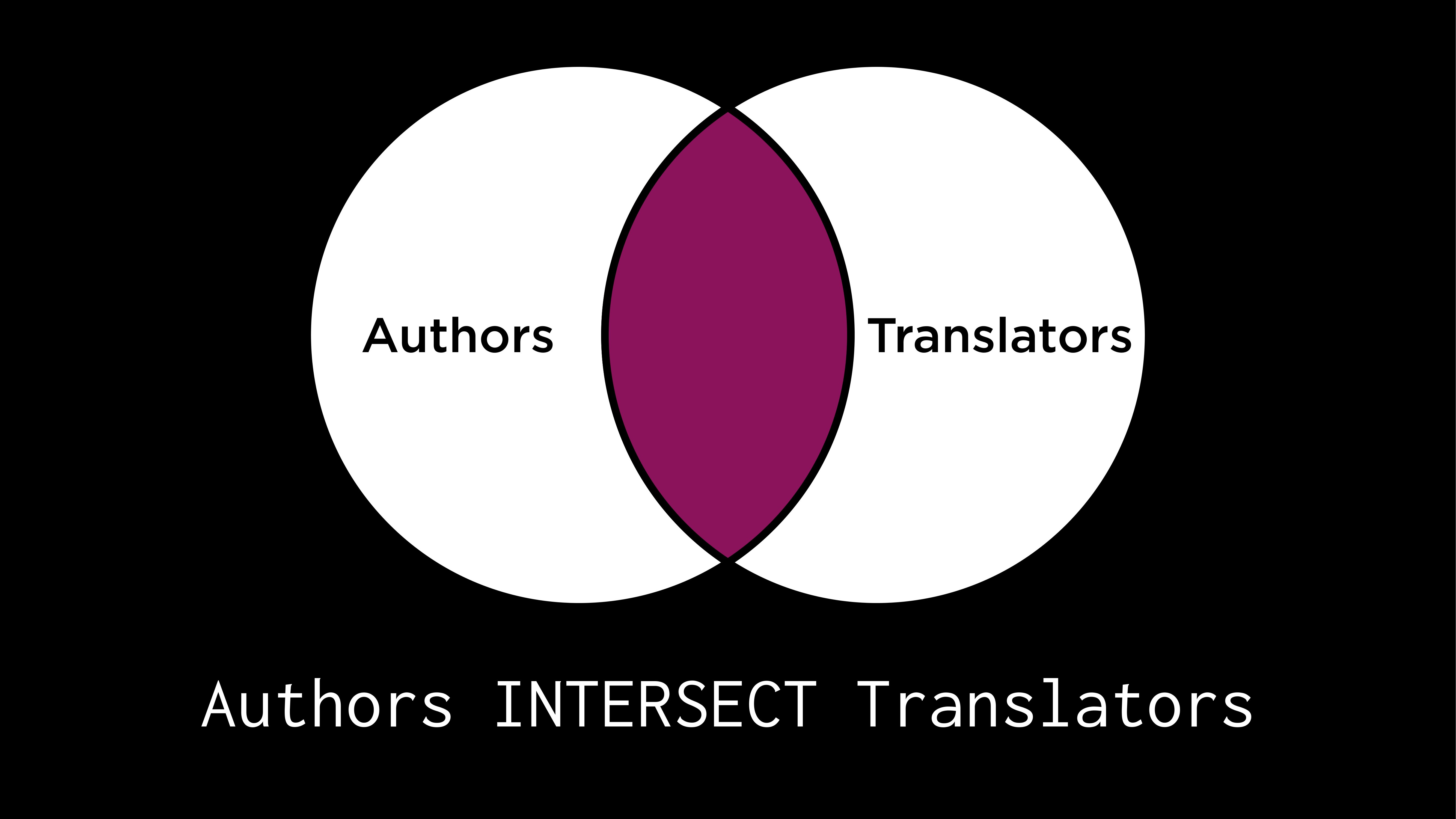
SELECT "name" FROM "translators"
INTERSECT
SELECT "name" FROM "authors"
UNION
- person is either an author or a translator or both
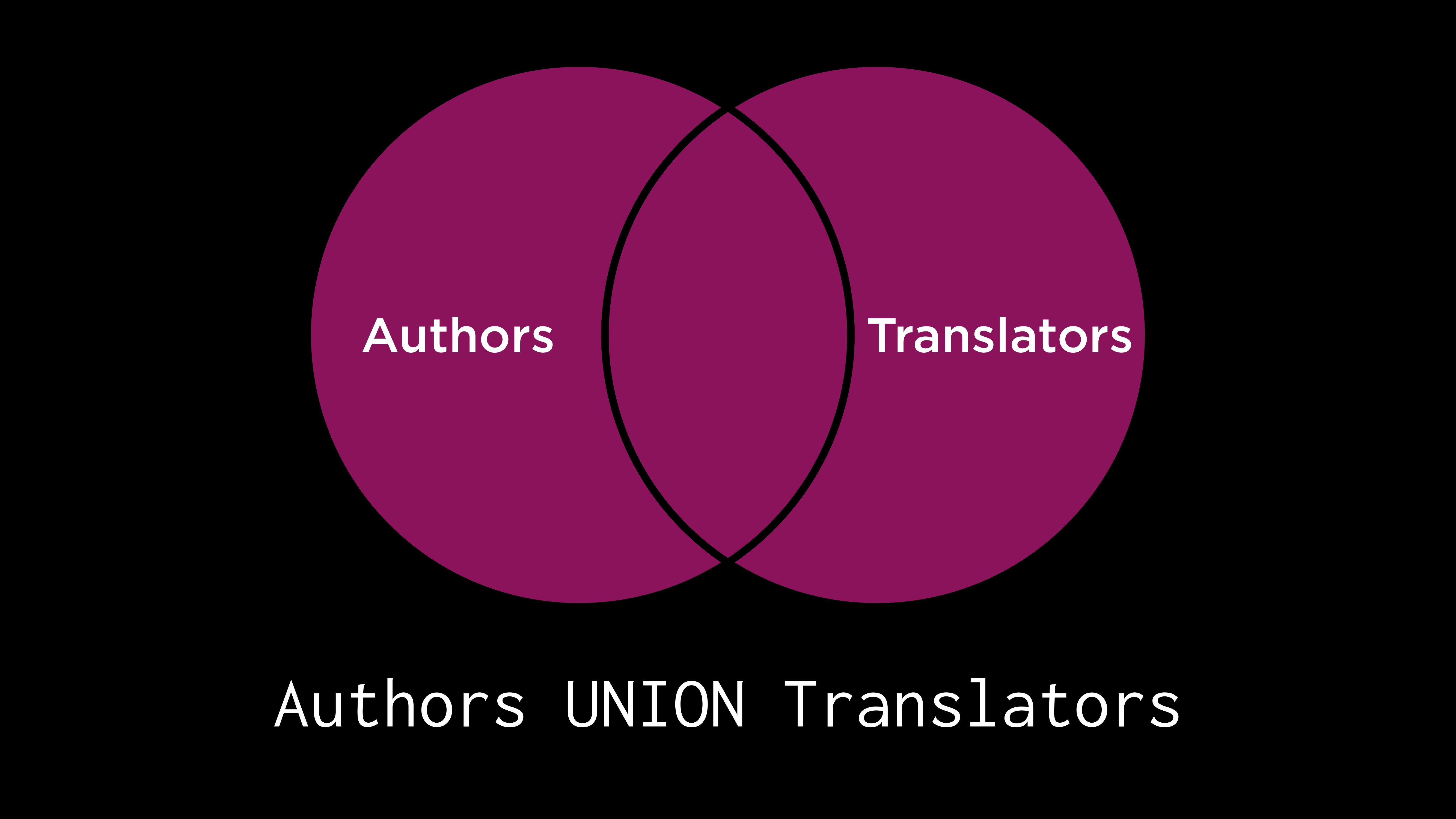
SELECT "name" FROM "translators"
UNION
SELECT "name" FROM "authors";
SELECT 'author' AS "profession", "name" FROM "authors"
UNION
SELECT 'translator' AS "profession", "name" FROM "translators";- Hardcoding a Column / Discriminator Column
SELECT 'author' ...: This tells the database: “For every single row you find in the authors table, just write the word ‘author’ in the first column.”SELECT 'translator' ...: This does the same for the second table.- There is NO
authorortranslatorcolumn
EXCEPT
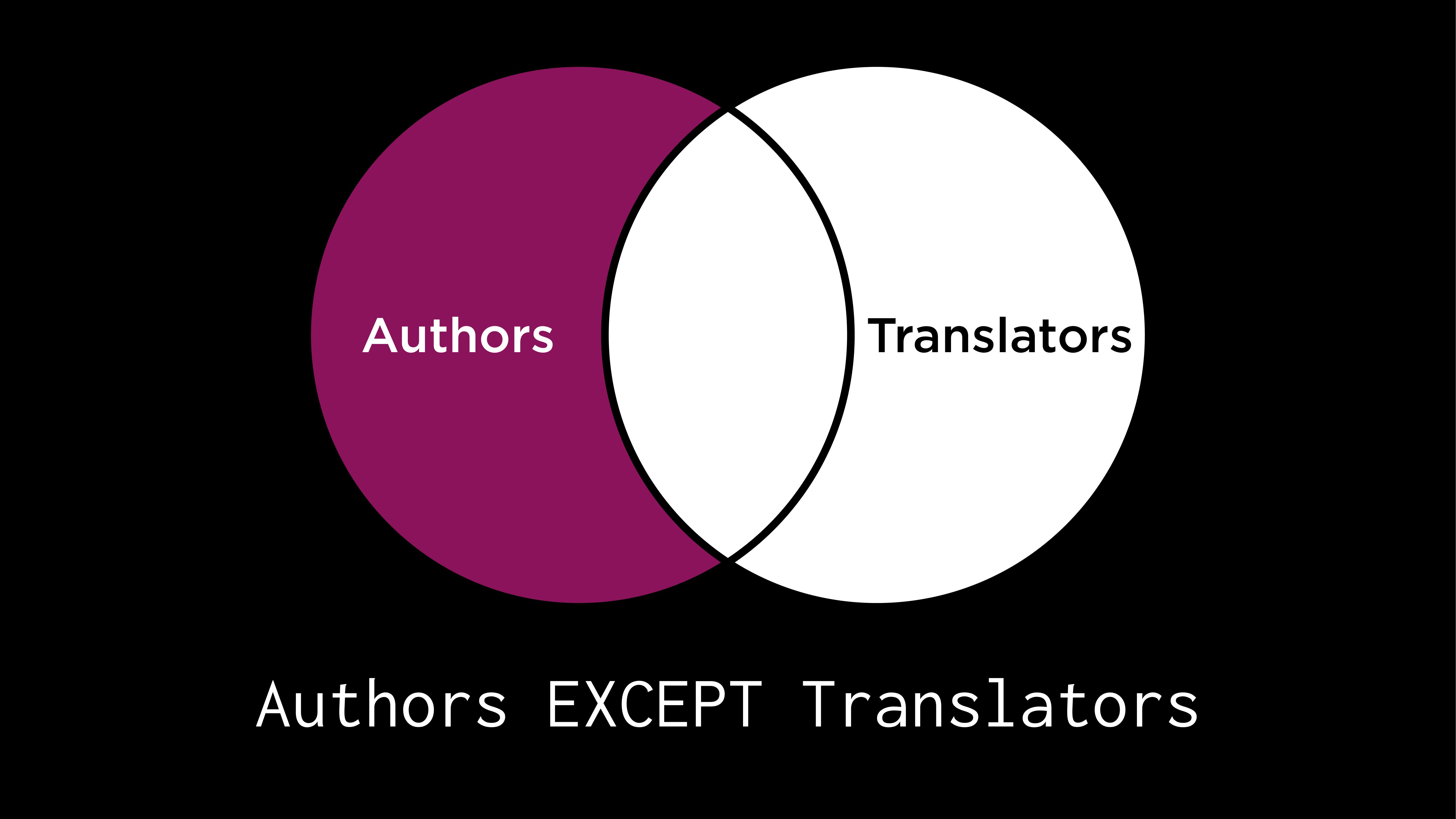
SELECT "name" FROM "authors"
EXCEPT
SELECT "name" FROM "translators";
Practice
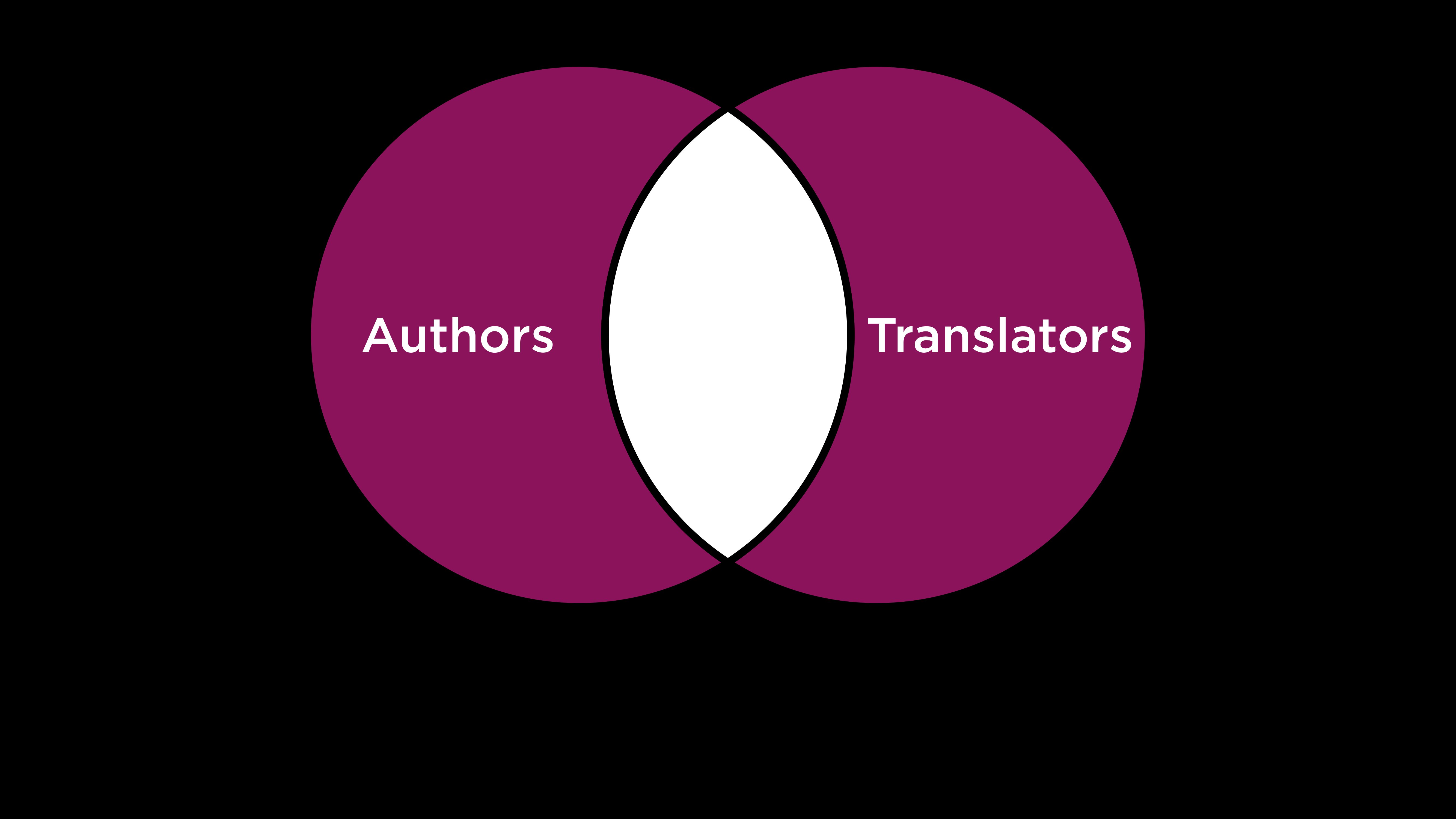
(
    SELECT "name" FROM "translators"
    UNION
    SELECT "name" FROM "authors"
)
EXCEPT
(
    SELECT "name" FROM "translators"
    INTERSECT
    SELECT "name" FROM "authors"
);- Books that have 2 translators
SELECT "book_id" FROM "translated"
WHERE "translator_id" = (
    SELECT "id" from "translators"
    WHERE "name" = 'Sophie Hughes'
)
INTERSECT
SELECT "book_id" FROM "translated"
WHERE "translator_id" = (
    SELECT "id" from "translators"
    WHERE "name" = 'Margaret Jull Costa'
);
Groups
GROUP BY
- Getting the average ratings by book id
SELECT "book_id", AVG("rating") AS "average rating"
FROM "ratings"
GROUP BY "book_id";
HAVING keyword
- Getting avg ratings by book id but more than 4.0
SELECT "book_id", AVG("rating") AS "average rating"
FROM "ratings"
GROUP BY "book_id"
HAVING "average rating" > 4.0;- because they’re now groups and not individual rows, we need to use a different keyword for conditions on groups
HAVING